What’s new in Progense
New features, improvements, and fixes — shipped quietly and often. No launch-day spectacle, just a product that keeps moving.
- July 9, 2026Latest
Truer statuses, a safer go-live, and workspace cleanup
Statuses that are always current
A project or milestone that slips past its due date now reads as off track the moment it happens — on every list, card, timeline, and report — instead of holding onto an old “on track” until something else refreshed it. What you see is always the real, up-to-the-minute status.
Dates stay in order as you plan
You can no longer set a task to start before its milestone, or a milestone before its project. Dates are kept in sequence as you plan, so a stray date can’t quietly push your timeline out of order.
No more launching a project in the past
Taking a project live that’s still set to start on a date already gone by? We now flag it — and let you shift the whole plan forward to start fresh (keeping every milestone and task’s spacing) or go live as-is if it genuinely began earlier. You can also pick the exact date it starts as it goes live.
A clearer path to go-live
Anything holding a project back from going live is now spelled out plainly — what still needs a date, what’s out of order, which milestone each task belongs to, and the dates its tasks span — so you can fix it right there. And when you shift a plan’s dates, the preview groups every task under its milestone in plain language.
Project cards show their dates
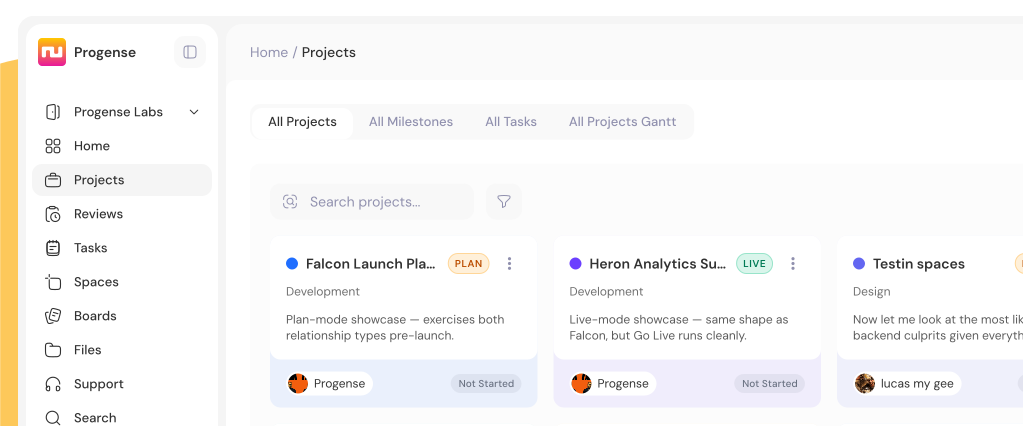
Every project card now shows its start and end dates at a glance, so you can see when work runs without opening it.
Delete a workspace
Clear out a workspace you no longer need, right from Settings → Account. It permanently removes that workspace and everything inside it — and your teammates keep their account and every other workspace, so no one loses access to anything else.
Settings feels instant
Switching between Settings tabs is now immediate, matching the rest of the app — no more waiting a beat for the page to change.
- July 8, 2026
Search across every workspace, smarter rescheduling, and polish
Search across every workspace
Global search now spans every workspace in your account, not just the one you're in. Results from another workspace are tagged with its name, and opening one takes you straight there — while still only ever showing what you have access to.
Search lives with your account tools
Because it now reaches your whole account, Search moved up alongside your account-level navigation, right where account-wide tools belong.
Smarter rescheduling
Pushing a task's dates no longer gets quietly hidden when "skip weekends" is on, and the date picker is quicker and clearer to work with.
Consistent, legible details
Checkboxes now look and behave the same on every screen — with a check mark that stays crisp in dark mode — and dates read the same wherever they appear.
Steadier billing emails
Clearer, more reliable notices when a payment needs attention or a trial is ending, so nothing important slips by.
- June 30, 2026
Sharper mentions, clearer project ownership, and live notes
Mentions look the same everywhere
@mentions now render with the person's avatar and name across every conversation — project chat, threads, task comments, and notes. No more stray formatting or a missing face on one surface but not another.
See who owns each client project
Client projects now show the client and the project lead together as one avatar pill — on the project card and in the info drawer — so you know whose work it is at a glance.
Notes and comments in real time
Task notes and comments now appear the moment a teammate posts them, no refresh required — the same live experience as the rest of your conversations.
Stays on your current workspace
Switch workspaces, then refresh, and you'll land right back where you were instead of being bounced to your first account.
- June 24, 2026
Reactions, cleaner message options, and a dark-mode home
Emoji reactions
React to any message, comment, or note with an emoji — and see who reacted at a glance. It works everywhere you talk: DMs, project chat, task comments, notes, and to-dos.
Cleaner message options
Hover a message for a tidy menu — react, reply, copy a link, edit, or delete — instead of a row of buttons on every line.
Dark mode by default
The app now opens in dark mode, easier on the eyes through a long working day. Prefer light? One toggle switches it back and remembers your choice.
Polished, consistent conversations
Every conversation now shares the same message layout, tables scroll cleanly inside a message, and a handful of small layout rough edges were smoothed out.
- June 22, 2026
New plans, friendlier billing, and sign in with Google
New Starter plan
A $19/mo plan between Forever and Business — 5 projects, Reports, and custom branding for solo operators and small teams ready to run real client work.
Cancel or resume anytime
Manage your own subscription from the billing page. Cancelling keeps your workspace read-only — never deleted — and you can resume in one click.
Add seats & storage as you grow
Top up team seats or storage on any paid plan at $7/mo per seat, instead of jumping a whole tier to get more.
Clearer upgrade prompts
Hit a plan limit and we tell you exactly what unlocks it, right where you are — no dead ends.
Sign in with Google
Create or access your account in one click — no password to remember.
Custom company logo
White-label the sidebar with your own logo for your team and your clients.
Activity feed
A running history of a workspace, grouped by day and project — who did what, with comments, notes, and photos shown inline. Filter by project or person to find a moment fast.
Cleaner, more focused pages
Activity and Notifications now read in a centred, comfortable column, and a few light-mode surfaces were tidied up for consistency.
- May 2026
Spaces, Schedule, and an assistant that knows your projects
Spaces
A visual canvas to map projects, milestones, and dependencies — then go live when the shape is right.
Schedule
Meetings, recurring events, and time-off that flows straight into your team's workload.
Personal AI
Ask questions about your projects and get answers grounded in your own data.
Plans & 14-day trial
A clear plan comparison and a 14-day trial of every feature, free.
- April 2026
Budgets, support tickets, and project boards
Budgets & profitability
Set a budget and an hourly rate, then watch margin update live as hours land.
Budget alerts
Get notified at 50, 70, 90, 100, and 125% — before you blow past the number.
Support tickets
Turn any support thread into tracked work, with status the client can follow.
Project boards
A Kanban board for each project's internal work, kept separate from client tasks.
- March 2026
The foundation
Projects, milestones, tasks
Status that computes itself from real dates — no dropdown to guess with.
Timeline
A visual Gantt from the whole portfolio down to a single task.
Client review & approvals
Completion belongs to the client, recorded with every reason and timestamp.
The collaboration layer
Time tracking, comments, notes, files, mentions, and real-time updates.
More on the way. We ship small and often — check back, or start using Progense and watch it grow.
Start freeBuilt for agencies. Over-engineered for honesty.
Every decision in Progense exists for one reason: to tell the truth about where your projects actually are. Not to make you look good on a Monday morning slide. To show you — and your clients — reality.
Get started
Free for 14 days, no card.